
Attendance calendar
A month-by-month view of your attendance, leave, and holidays.
Opening it
Tap the Attendance tab at the bottom of the screen.
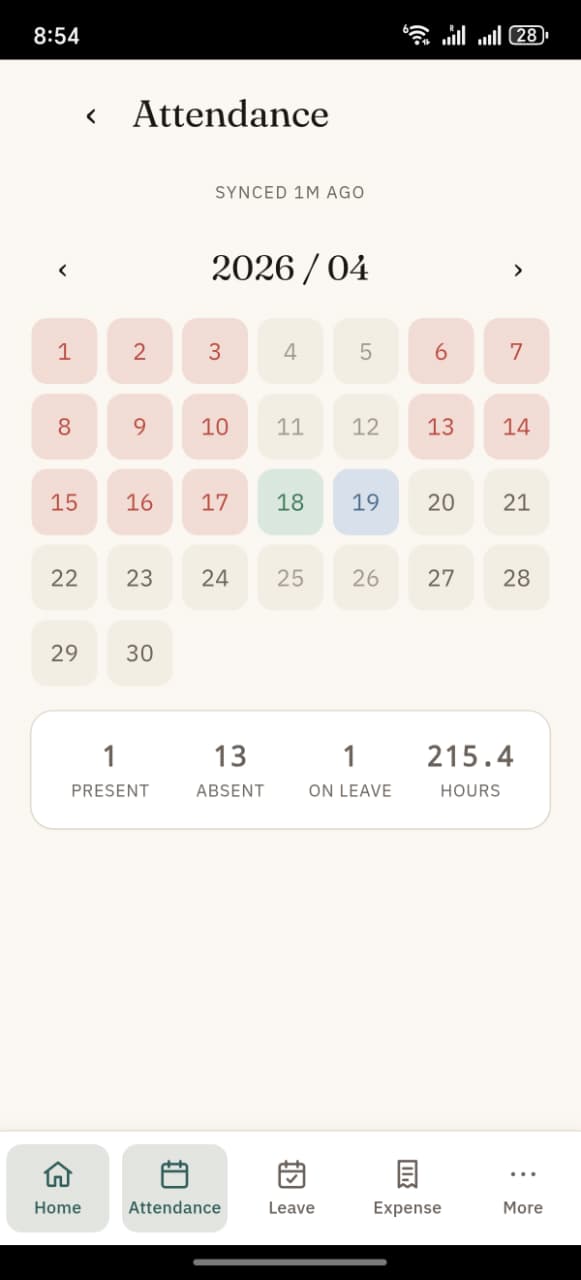
What you see
The month grid shows one cell per day of the current month. Each cell is colour-coded based on your status that day.
| Colour | Meaning |
|---|---|
| 🟢 Green | Present — you had at least one IN/OUT pair |
| 🔴 Red | Absent — no check-ins recorded that day |
| 🟡 Yellow | Half Day |
| 🔵 Blue | On Leave — approved leave covered that day |
| ⚪ Grey | Holiday — per your holiday list |
| ⚪ Light | Weekend |
Below the grid is a summary row with:
- Present — count of present days this month
- Absent — count of absent days
- On Leave — count of leave days
- Hours — total hours worked this month
Changing month
Top of the screen: ‹ 2026 / 04 ›
- Tap ‹ to go to the previous month
- Tap › to go to the next month
- The current month is shown in the middle
Tap a day for details
Tap any coloured cell to open a bottom sheet showing:
- Status — same as the colour (Present / Absent / …)
- Hours worked — to 2 decimals
- IN / OUT pairs — each pair with:
- Time in
- Time out
- Task (or "No task")
- Note: "auto-closed at midnight" if you forgot to check out
The auto-close rule
If you check in but forget to check out by midnight, the app automatically closes the pair at 23:59 of the same day. This is marked clearly in the detail sheet so it doesn't silently inflate your hours.
Times are in your phone's timezone
All times shown (IN / OUT on attendance days, check-in history, etc) are rendered in your phone's local timezone. If you travel — for example, phone in Riyadh (UTC+3) checking in against a company site in Muscat (UTC+4) — you'll see Riyadh-local times on the phone, and HR will see Muscat-local times in the ERP. Both represent the same real moment.
Skeleton loading
When you open the tab for the first time in a session, you'll see a pulsing grey grid for a second or two while the month data loads. Once the data arrives, the real colours fill in.
What counts as "Present"
A day is Present if:
- You have at least one IN / OUT pair recorded
- OR an Attendance row exists on that date with status = Present (e.g. created by HR)
What counts as Absent:
- No check-ins AND no Attendance row for that date
- AND the date is in the past
Future days with no data show as blank (neither green nor red).