
View payslips
See your monthly payslip, inspect the breakdown, and download a PDF.
Open the Payslip list
Access it from:
- Home → Payslip (quick action tile), or
- More tab → Payslip
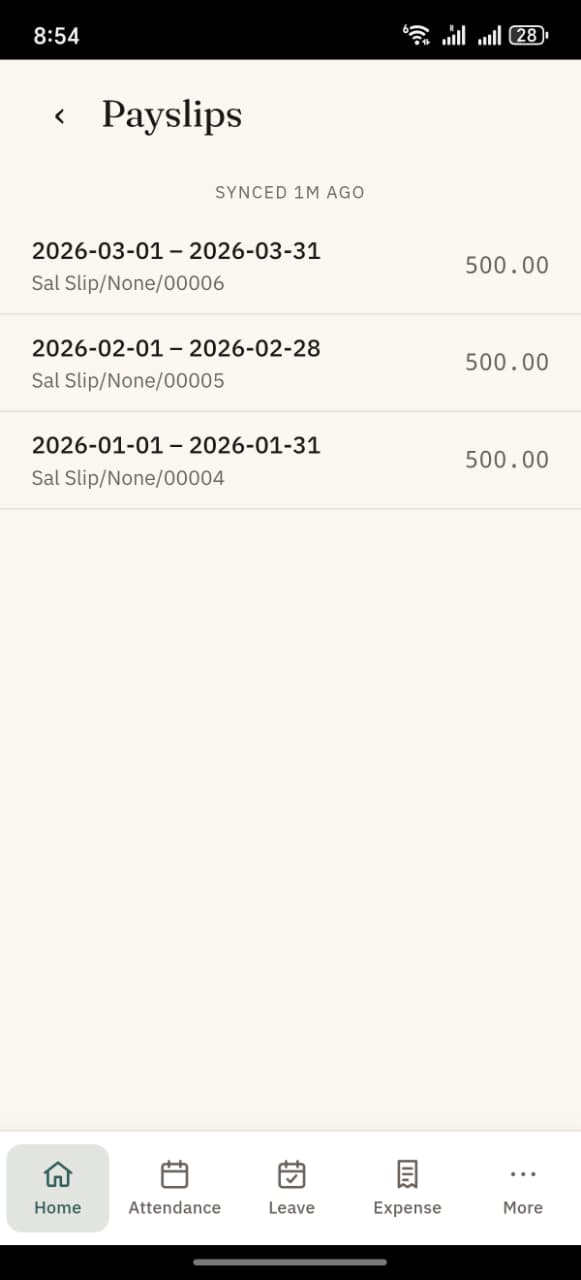
The list
Each row is one monthly payslip, most recent first. You see:
- Slip name (e.g.
Sal Slip/None/00006) - Period — start date → end date (e.g.
1 Mar – 31 Mar) - Net pay in your company's currency
Past slips stay in the list indefinitely — you can always open an old month.
Tap a payslip
Opens the payslip detail screen showing:
- Net pay at the top in large text, with the currency symbol (e.g. the Saudi Riyal glyph for SAR-denominated slips)
- Earnings card — each component (Basic, HRA, Allowances, …) with its amount
- Deductions card — each deduction (if any) with its amount
- Two action buttons: Download and Share
Download the PDF
Tap Download.
On the native Android app:
- The PDF is saved to your phone's Documents folder
- You see a confirmation: "Saved to Documents."
- Open a file manager / Google Files app → Documents → there it is
- Filename looks like
Sal_Slip_None_00006.pdf(slashes in the original name are replaced with underscores so file systems can handle it)
On the web app:
- Your browser downloads the PDF to its default Downloads folder
- Some browsers open it in a new tab first — use the browser's save option from there
The PDF is the full formal payslip as generated by your Frappe HR setup — same format HR prints and sends via email.
Share it
Tap Share to open your phone's share sheet and send the PDF directly to:
- Email (Gmail, Outlook, …)
- Google Drive / Dropbox
- Any other app that accepts PDF
On the web, Share falls back to Download on browsers that don't support the native share API.
Offline behaviour
- The list of payslips — cached after the first time you view it; works offline
- A specific payslip's breakdown — only available offline if you've opened it at least once while online
- The PDF — cached if you've downloaded it before while online; any earlier downloads stay in Documents / browser Downloads regardless of network
If something's wrong with the amounts
If you spot an incorrect figure:
- Don't edit in the app — payslips are read-only from the mobile side
- Contact HR with your payslip name (
HR-EXP-2026-00001etc.) so they can open it on the Desk and fix
Why does it say "Sal Slip/None/…"?
That's the default Frappe naming series your HR team hasn't customised. It still works correctly — the name is just a bit awkward. HR can change the naming series in Payroll Settings → Salary Slip Naming Series on the Desk.